
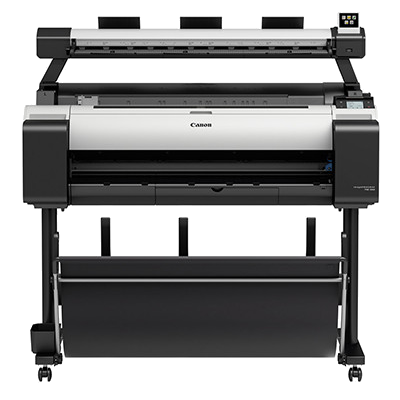
imagePROGRAF TM-300 MFP L36ei
- SKU:
- TM300MFP


Description
Purchase before December 31st and receive a free Selphy Square QX10 printer
Canon’s imagePROGRAF TM 300 MFP L36ei is a multifunction printer that’s purpose built for CAD environments. Fast, efficient and compact, this economical wide format printer will enhance your small office workflow and give you the professional advantage.
Your user friendly printer that raises the bar for efficiency and quality
Your Canon ImagePROGRAF TM-300 MFP L36ei is purpose designed for growing ACE environments. With a small footprint and extremely low noise levels, it fits into the tightest office space to generate large format prints in vibrant colour and sharp detail, quickly, quietly, and economically. Affordable and easy to use, it’s a scanner, copier and printer on one.
60% quieter to minimise distractions while you work
With its smart noise dampening technology, the only thing you’ll notice about your Canon is its incredible output and high quality print.
With pigment based LUCIA TD ink in five colours, your imagePROGRAF is the most efficient, low cost way to generate professional large format prints.
Faster printing
Continuous printing is now faster thanks to the improved printing sequence optimisation, and that means your business deadlines are now just that much more attainable.
Lower ink consumption
Ink consumption is just as low, and sometimes lower, than previous models, thanks to the excellent colour performance of LUCIA TD ink, as well as new optimised image processing parameters.
Flexible paper stacking options
In addition to a standard print basket, a flat stacker is available to you which you can set in any of three positions: regular position, to hold a single sheet; draped position, to hold 20 sheets; and flat position, which also holds 20 sheets. Documents are stacked face down in the order of printing, eliminating the hassle of having to re-sort them and allowing printed documents to be easily removed in front of the printer.
Encryption
Using the IPSec protocols from the advanced Canon TM-series, the TM-300 also employs encryption to protect you from interception, tampering, or spoofing. Furthermore, because of its IPSec protocols, it can protect data sent over the internet regardless of the applications or network configurations used. You enjoy additional protection with SNMPv3 – a protocol that enables the online monitoring and control of any devices connected to a TCP/IP network. What’s more, when you access a printer via a web browser, a server certificate is installed on the printer for safe, encrypted communication using SSL/TLS.
Authentification
IEEE 802.1x authentication prevents devices (other than predetermined ones) from connecting to a computer network, ensuring that you can block communication from devices other than those authenticated by your server. (Wired connections only.)
Security restrictions
With the TM-300, you can restrict Ethernet and USB connections to your printer, as well as restrict printing from USB flash drives – just one more useful security option. In addition, any use of FTP and Telnet communication protocols can also be restricted. Security in the TM-300 has been greatly enhanced over earlier models. Information security for network printers with multiple users has been improved considerably with new measures to prevent intrusion or leaks of confidential data.
Secure disk erasure
The TM-300 allows you to erase confidential or sensitive data completely without it being recoverable. Rest assured, our method is so secure it even meets the standards of the US Department of Defence.
Integrated printer drivers
The printer drivers are integrated into a single package. So, when installing your printer(s), the complete printer driver package will be installed too, allowing you to add new models easily simply by using the ‘Add Printer’ option – a considerable time saver.
Auto selection of media type
The printer driver introduces functions for efficient high-volume output of drawings and other print jobs. You can simply configure media type settings on the printer's operation panel without having to specify the type of media in the printer driver. Furthermore, you won’t need to complete print settings on each and every computer if your printer is shared over a network. Simply do it once, and get on with more important things.
Direct Print & Share
This software enables you to batch print multiple files of various types – PDF, JPEG, TIFF and HP-GL/2 – without having to start up the dedicated applications. In addition, the shortcut printing function can be used to perform printing according to pre-registered print settings. Saved files can be uploaded to cloud storage and shared among remote locations or across multiple sites. So, any way you look it, you’ll be saving time and increasing your productivity to boot.
PosterArtist Lite
You can now easily create professional looking posters with a wide variety of templates, stock photos and clip art, right out of the box.
Free Layout plus
This software integrates two acclaimed programs that allow you to create posters, internal bulletins, and other larger-format documents. Print Plug-In for Office enables easy large-format output of documents created in Microsoft Office. Free Layout function allows you to arrange documents created in Microsoft Office programs, Adobe Illustrator, or other applications, including nesting, folded duplex, and other layouts.
Easy-PhotoPrint Editor
You can take full advantage of this invaluable feature to create posters, calendars and other documents simply and conveniently. This application can also be used with the PIXMA series and is available for both Windows and Mac users. It is also available for both leading mobile operating systems (iOS and Android) when printing from mobile devices.
Related Products

imagePROGRAF TM-200 MFP L24ei


MFP-5YR-OSS 5 YEAR ON-SITE SUPPORT AND SERVICE PACK FOR - TM MFP
Canon


imagePROGRAF PRO-2100


POSTER ARTIST 2014 DESIGN SOFTWARE FOR IMAGEPROGRAF PRINTERS
Canon

